Introduction to Terminal
Overview of Linux
Linux is a free OS and very similiar to the UNIX OS in terms of concepts and features.
Linux System Structure
Linux system has three main components:
| Kernel: | It controls system hardware including memory, processors, disks, and I/ O (Input/ Output) devices. It schedules processes, enforces security, manages user access, and so on. The kernel receives instructions from the shell, engages appropriate hardware resources, and acts as instructed. |
|---|---|
| Shell: | (This the important part for our class) The shell is a program that accepts and interprets text-mode commands. The user provides instructions (commands) to the shell, which are interpreted and passed to the kernel for processing. |
| Hierarchical directory structure: | |
Linux uses the conventional hierarchical directory structure where directories may contain both files and sub-directories. Sub-directories may further hold more files and sub-directories. A subdirectory, also referred to as a child directory, is a directory located under a parent directory. > 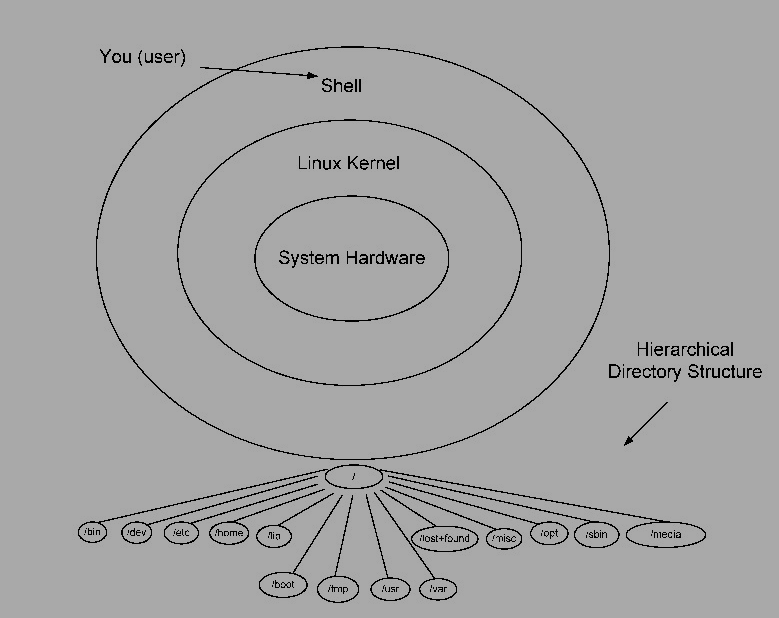
|
|
Starting a Shell
- Through SSH
- Using graphical interface
[] prompt, waiting for you to start entering commands.
Terminal Commands
pwd (Print Working Directory)
When you first login, you are logged into your home directory (/home/username).
To find out what is your current working directory, type
$ pwd
/home/kiriya
mkdir (makding a directory)
To make a subdirectory called Software in your home directory, type
$ mkdir Software
cd (change directory)
To change the current directory to the “Software”, type
$ cd Software
:~$ cd ../ -by typying this you can go back to where you started.
Excercise
Use the Terminal commands we already learned to do the following steps.
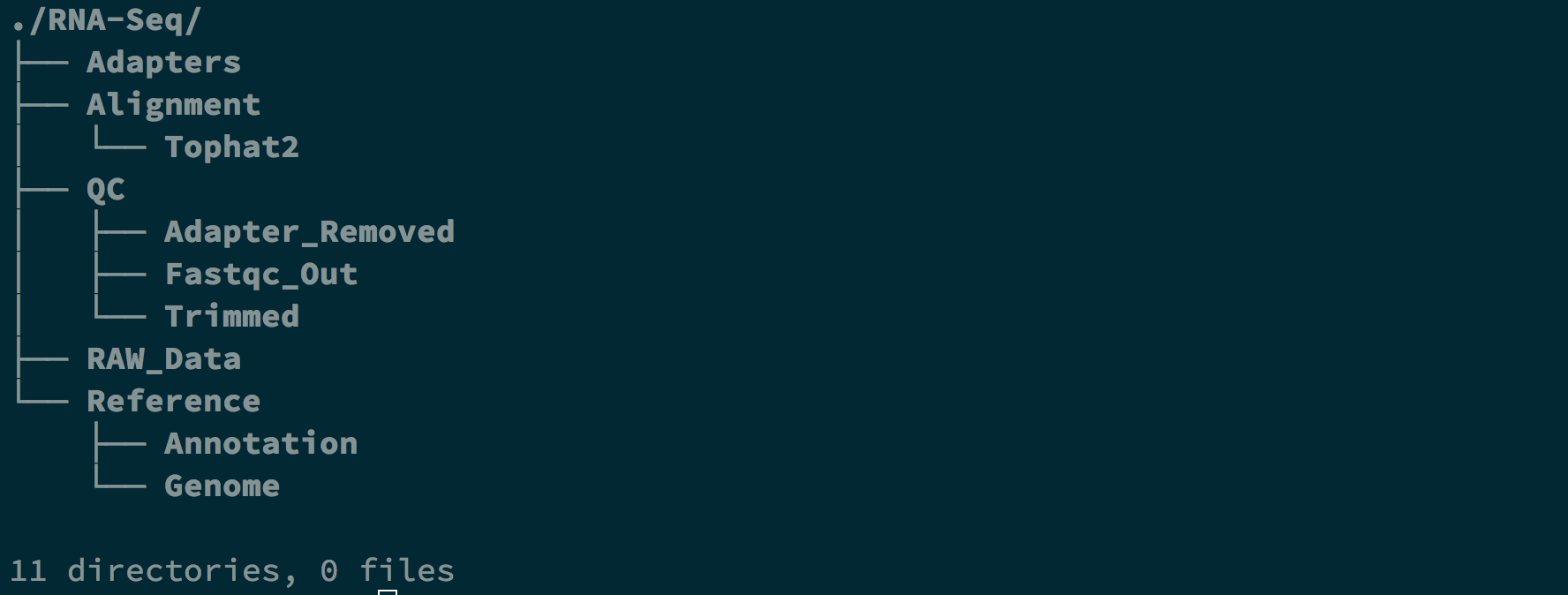
Creat following directory structure in your “Home Directory”
RNA-Seq/Reference/Genome
RNA-Seq/Reference/Annotation
RNA-Seq/RAW_Data
RNA-Seq/Adapters
RNA-Seq/QC/Fastqc_Out
RNA-Seq/QC/Adapter_Removed
RNA-Seq/QC/Trimmed
RNA-Seq/Alignment/Tophat2
Note
You might have to use “-p” option to create non-exsisting intermediate directories**
Final output:
File Handling Through the Terminal
Displaying Content of a File
| cat: | display whole content of a file on the screen |
|---|---|
| less: | display contents of a file onto the screen a page at a time |
| head: | display first ten lines of a file to the screen |
| tail: | display last ten lines of a file to the screen |
cat [filename]
$ cat sequence.fastq | less
less [filename]
$ less sequence.fastq
head [filename]
$ head sequence.fastq
tail [filename]
$ tail sequence.fastq
Searching the Contents of a File
grep [options] [word_to_find] [filename]
$ grep "@" sequence.fastq
  @D00109:408:C77LEANXX:2:1101:1715:1962 1:N:0:18
Concatenating two or more files
cat [fist_file.txt] [second_file.txt] [thrid_file.txt] .... [N_file.txt] > [output_file.txt]
$ cat first.txt second.txt > third.txt
Excercise
- Count the number of sequnces in a fastq.gz file
Note
Use zcat and pip (“|”) the output to grep -c [word_to_grep]